eBiz Portal Login For Punjab Scheme Registration 2025


 WhatsApp Channel
For all entrepreneurs and business owners in Punjab, understanding the eBiz Portal Login process is the key to accessing a world of government services. The eBiz Portal is the official online platform designed to simplify business operations and scheme registration for the year 2025. Your login credentials are your digital key to a streamlined experience, allowing you to manage applications, track status, and avail benefits from various government initiatives without any physical hassle.

The Punjab Scheme Registration 2025 cycle is now active on this portal. Whether you are a new startup seeking an initial registration or an existing business looking to benefit from new incentives, the journey begins with a successful eBiz Portal login. This system is part of the government’s commitment to the “Ease of Doing Business” policy, ensuring that all eBiz services are just a few clicks away for every citizen, saving both time and resources.
eBiz Portal Login Step By Step 2025 Brief Details
| Feature | Details |
| Platform Name | eBiz Portal – Punjab Business Registration |
| Primary Function | Online Business & Scheme Registration |
| Year | 2025 |
| Official Login Website | https://register.business.punjab.gov.pk/ |
| Registration Status | Active and Ongoing for 2025 Schemes |
| Last Date | Varies by scheme; the portal is a permanent facility. |
| Eligibility | Pakistani citizens and entities with a valid CNIC and a business in Punjab. |
How to Access the eBiz Portal Login Registration
Accessing the eBiz Portal login is straightforward. First, you need a stable internet connection. Open your web browser (like Chrome, Firefox, or Edge) and go to the official URL: https://register.business.punjab.gov.pk/. This will lead you directly to the homepage of the “Ease of Doing Business’ Online Registration System,” where you will find the login section. It is crucial to use this official link to avoid fraudulent websites.
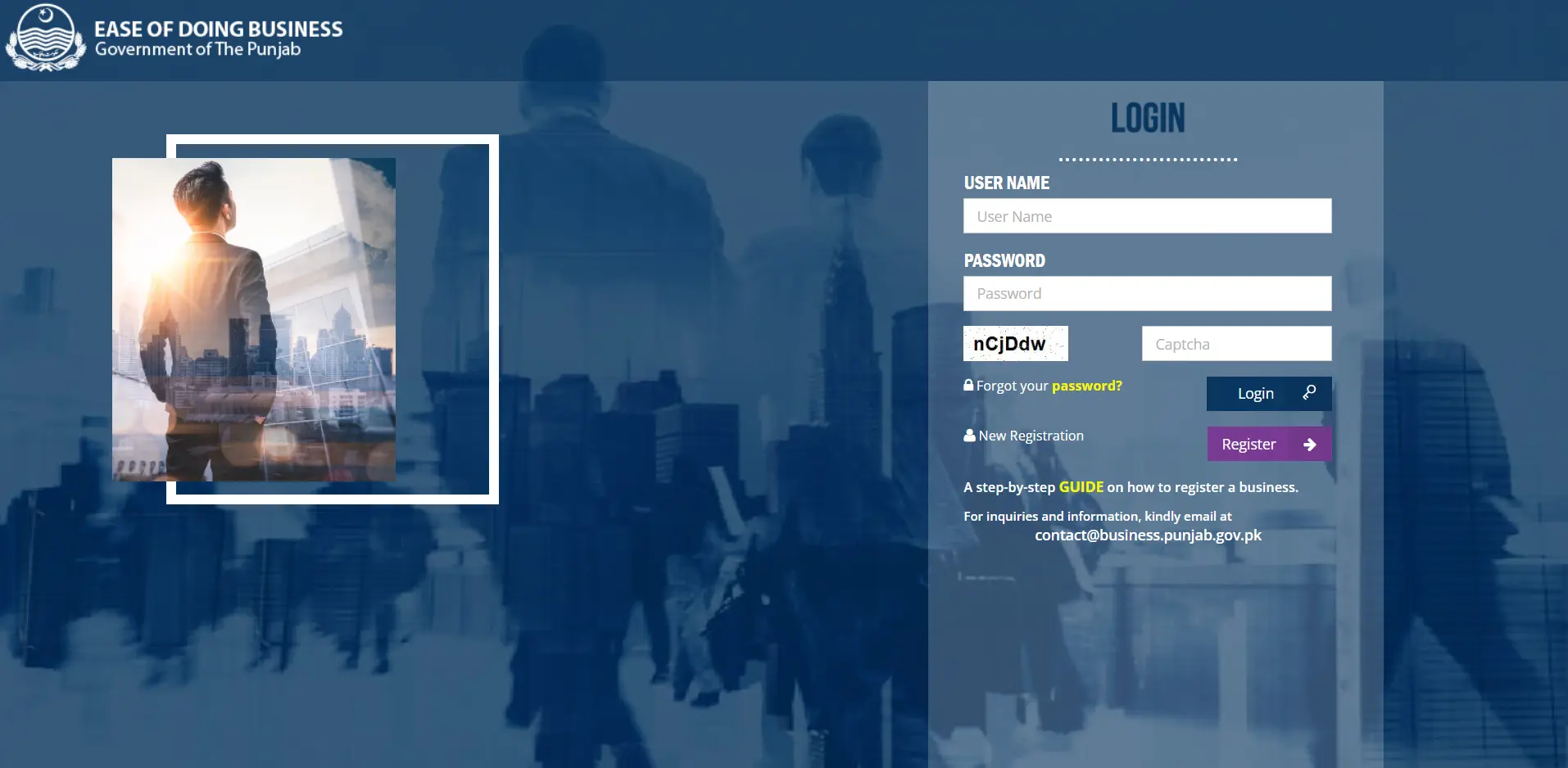

If you are a new user, you will not be able to log in immediately. You must first complete the new registration process on the same website. This involves providing your mobile number, email address, and CNIC details to create your account. Once registered, your login ID and password will be sent to your email, which you can then use on this login page to access your personal dashboard.
Completing the Punjab Scheme Registration 2025
After a successful eBiz Punjab Portal login, you can proceed with the Punjab Scheme Registration 2025. Inside your dashboard, you will find various services and schemes listed. You can select the specific scheme or business registration type you are interested in, such as Sole Proprietorship or Partnership Firm (AOP). The portal will guide you through a digital form, which you need to fill out with accurate business and personal details.

The portal acts as a single window facility, meaning you can apply for multiple services through one interface. During the scheme registration process, you may need to upload scanned copies of required documents, such as your CNIC. After filling the form and uploading documents, you can submit the application and pay any associated fees online, all within the secure environment of the portal after your login.
Benefits of Using the eBiz Portal Login
Using your eBiz Portal login offers numerous benefits. The most significant advantage is 24/7 application tracking. Once logged in, you can check the real-time status of your submitted applications anytime, from anywhere. This brings complete transparency to the process, as you are no longer left in the dark about your application’s progress with various government departments.
Furthermore, the portal provides a secure document storage space. All your submitted documents and details are saved in your account profile. This means you don’t have to re-upload the same documents for different services or future applications. Your eBiz login dashboard serves as a centralized management system for all your business-related interactions with the Government of Punjab.

Troubleshooting Common eBiz Login Issues
Some users face issues during the eBiz login Portal. The most common problem is forgetting your password. If this happens, do not create a new account. Simply click on the “Forgot your password” link on the login page. You will need to enter the email address you used for registration, and the system will send you a new password to regain access to your account.
Another issue could be not receiving the login credentials after registration. In this case, check your email spam or junk folder. The email containing your User ID and password might have been filtered there. If the problem persists, it is advisable to use the contact information provided on the official website for technical support.
Conclusion:
In conclusion, the eBiz Portal Login facility is your essential gateway to participating in the Punjab Scheme Registration 2025. This digital platform empowers business owners by making government services accessible, transparent, and efficient. By mastering the simple login process, you unlock the full potential of this one-window operation, paving the way for your business’s smooth registration and future growth in the province.
Frequently Asked Questions (FAQs)
- What is the official website for eBiz Portal login?
The official website for eBiz login is https://register.business.punjab.gov.pk/. This is the only authentic platform for business and scheme registration. - I forgot my password. How can I log in?
On the login page, click the “Forgot your password” link. Enter your registered email address, and the system will automatically email you a new password to access your account. - Who can register on the eBiz Portal for Punjab Schemes?
Any Pakistani citizen who owns a business located in Punjab or intends to start one can register on the eBiz Portal. The primary requirement is a valid CNIC. - Can I use the eBiz Portal on my mobile phone?
Yes, the eBiz Portal is a website that is mobile-responsive. You can easily access the login page, register, and manage your applications using a mobile browser on your smartphone. - What should I do if I do not receive my login credentials after registration?
First, check your email’s spam or junk folder. If the email is not there, ensure you entered the correct email address during registration. If the problem continues, you should contact the technical support team through the contact details available on the official website.